Unit settings dialog box
The Unit settings dialog box allows you to configure which campaign date is displayed on the map, and what icon style is used for the unit.
In addition, if it is a GATA field unit, then you can also define whether or not the signal color is displayed on the map, and if an icon is used to display the signal rather than a solid line. You can also select to display the location and appearance of the Direction finder pop-up.
NOTE: After any changes are made you must refresh your browser for them to be displayed.
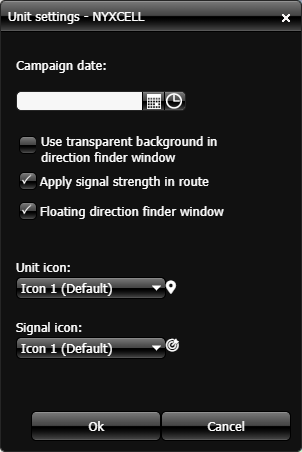
 Campaign date
If you have a specific campaign date for the field unit that you want displayed on the map then select the date and time of the campaign. Note, if you have a date selected in Apply the date to all selected units? then that overrides this setting.
Use transparent background in
direction finder window
This setting is only available when the field unit type is GATA.
Click to display the Direction finder pop-up with a transparent background. This allows you to maintain visibility of the map.
Apply signal strength in route
This setting is only available when the field unit type is GATA.
Select if you want to display the signal strength color on the signal trail.
Floating direction finder window
This setting is only available when the field unit type is GATA.
Select if you want to allow the Direction finder pop-up to move over the entire Software description. If this is not selected then the Direction finder pop-up is limited to moving within the field unit tab on the GATA panel.
Unit icon
Select which icon you want used to display the field unit on the map.
Signal icon
This setting is only available when the field unit type is GATA.
If you want to use an icon to display the signal trail then select one from the available options.